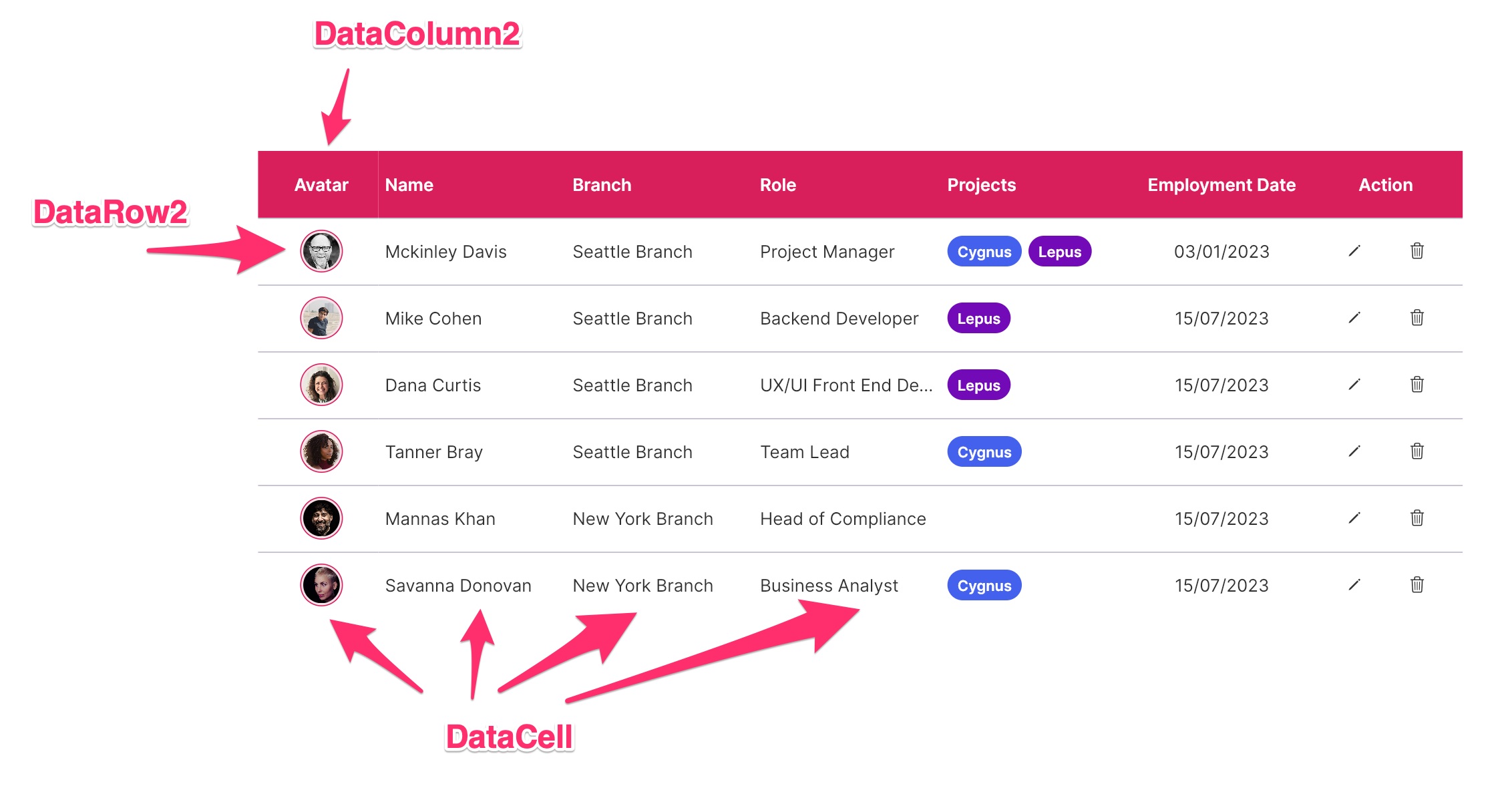
If you require a table with static data and do not necessitate pagination functionality, the FUIDataTable2 is the appropriate widget.
Anatomy Many of the details are documented in the data_table_2 documentation. For the sake of simplicity, a basic FUIDataTable2 would anticipate the following:
DataColumn2: The widget class responsible for defining the table header column.
DataRow2: The widget class responsible for defining the table content row.
DataCell: The widget class responsible for defining the content cell for each DataRow2.
Note: For ease of development, kindly utilize the FUIDataTableColumnHelper and the FUIDataTableCellHelper, which facilitate the generation of both the column and the cell.
The FUIDataTable2 widget class could be found in:
lib/focus_ui_kit/components/datatable2/fui_datatable2.dart
The FUIDataTable2Theme class is the theme class holds the default theme variables/values.
Accessing the theme To access the theme class object, do the following:
@override
Widget build(BuildContext context) {
FUIDataTable2Theme dtTheme = context.theme.fuiDataTable2;
// ...
}
Important Note: The FUIDataTable2 will have a default height of 400 (it is not advisable to have the height unrestrained).
Usage Here’s a simple guide on how to define a FUIDataTable2 with static data using the FUIDataTableColumnHelper and FUIDataTableCellHelper classes.
// Define the color scheme (optional)
FUIColorScheme fuiColorScheme = FUIColorScheme.primary;
FUIDataTableColumnHelper dtColumnHelper = FUIDataTableColumnHelper(context, fuiColorScheme: fuiColorScheme);
FUIDataTableCellHelper dtCellHelper = FUIDataTableCellHelper(context);
FUIDataTable2(
fuiColorScheme: fuiColorScheme,
columns: [
DataColumn2(
label: dtColumnHelper.genLabel(text: 'Column 1 (Center Aligned)', alignment: FUIDataTable2Alignment.center),
),
DataColumn2(
fixedWidth: 400,
label: dtColumnHelper.genLabel(text: 'Column 2 (Left Aligned Fixed Width)'),
),
DataColumn2(
label: dtColumnHelper.genLabel(text: 'Column 3 (Right Aligned)', alignment: FUIDataTable2Alignment.right),
),
],
rows: [
DataRow2(
cells: [
DataCell(dtCellHelper.genData(text: '01/01/2023', alignment: FUIDataTable2Alignment.center)),
DataCell(dtCellHelper.genData(text: 'Some Text...')),
DataCell(dtCellHelper.genData(text: 'Some Text...', alignment: FUIDataTable2Alignment.right)),
],
),
DataRow2(
cells: [
DataCell(dtCellHelper.genData(text: '01/01/2024', alignment: FUIDataTable2Alignment.center)),
DataCell(dtCellHelper.genData(text: 'Some Text...')),
DataCell(dtCellHelper.genData(text: 'Some Text...', alignment: FUIDataTable2Alignment.right)),
],
),
DataRow2(
cells: [
DataCell(dtCellHelper.genData(text: '01/01/2025', alignment: FUIDataTable2Alignment.center)),
DataCell(dtCellHelper.genData(text: 'Some Text...')),
DataCell(dtCellHelper.genData(text: 'Some Text...', alignment: FUIDataTable2Alignment.right)),
],
),
],
);
Adjusting the height and width
FUIDataTable2(
height: 600,
width: 600,
...
);
In the data display section, the vertical or horizontal bar display can be toggled.
FUIDataTable2(
isHorizontalScrollBarVisible: true,
isVerticalScrollBarVisible: true,
...
);
Empty row message To configure a distinct message to be displayed when no rows (an empty DataRow2 list) are detected.
FUIDataTable2(
emptyMsg: 'No data available for now.',
...
);
or have a custom widget for the message:
FUIDataTable2(
empty: Align(
alignment: Alignment.center,
child: Icon(
CupertinoIcons.exclamationmark_triangle,
size: 40,
),
),
...
);
27 March 2025