Wizard
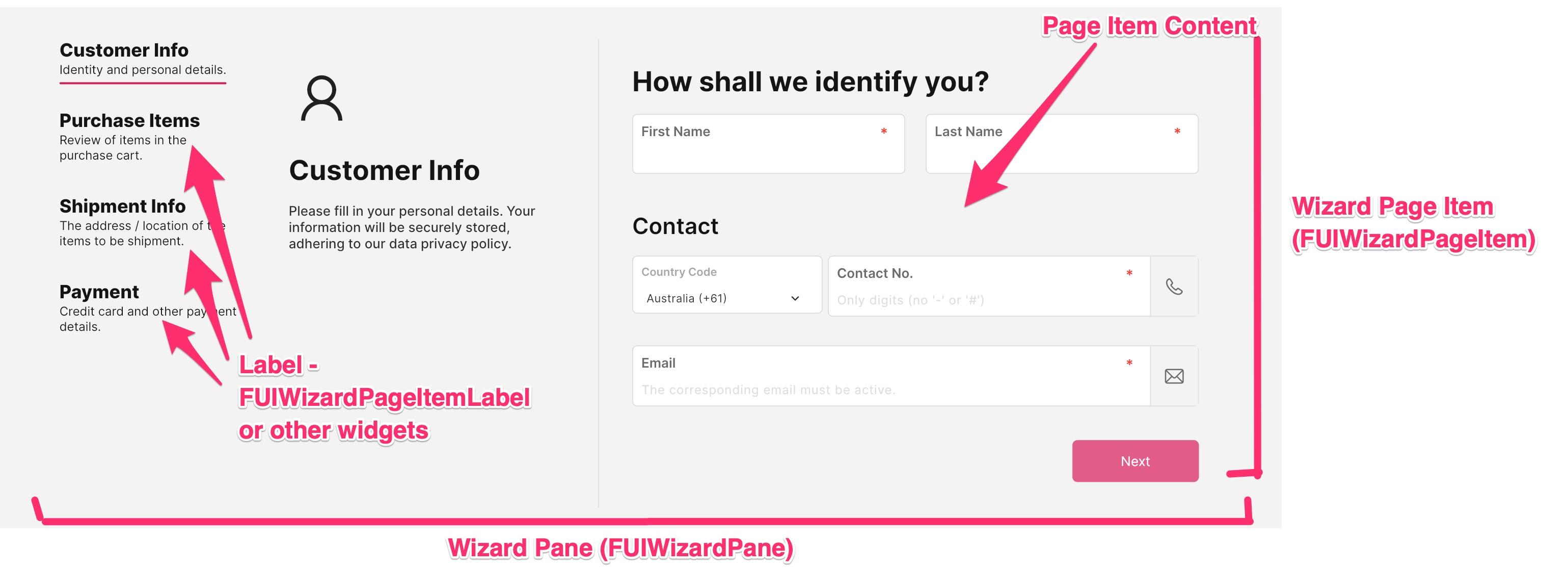
Inspired by the wizard component of HTML/Javascript Bootstrap, the Focus UI Kit offers a comprehensive form wizard implementation.
Widget Class Location
The wizard widget classes could be found in the directory of:
Class Details
Class Name | Dart File | Description |
|---|---|---|
| fui_wizard_pane.dart | The wizard pane which consists of all the page items and labels for the wizard. |
| fui_wizard_page_item.dart | The widget which encapsulates the page item and the label. |
| fui_wizard_page_item.dart | The label display widget for the wizard (optional). |
| fui_wizard_events.dart | The controller for the wizard pane and paging. |
Widget Theme Location
The FUIWizardTheme class is the theme class holds the default theme variables/values.
Accessing the theme
To access the theme class object, do the following:
Usage (simple tutorial)
To comprehend the functionality of the Wizard pane and its components, kindly refer to the provided tutorial for a comprehensive understanding of how these elements interact.
Define the wizard pane controller
The UI Kit’s wizard pane is ineffective without a wizard pane controller. Let us define a FUIWizardPaneController:
Define the item content widgets
Let’s incorporate “Next” and “Previous” buttons into the page item contents.
Define the wizard pane and the items
Compile all the above in the wizard pane.
FUIWizardPageItemLabel with different style
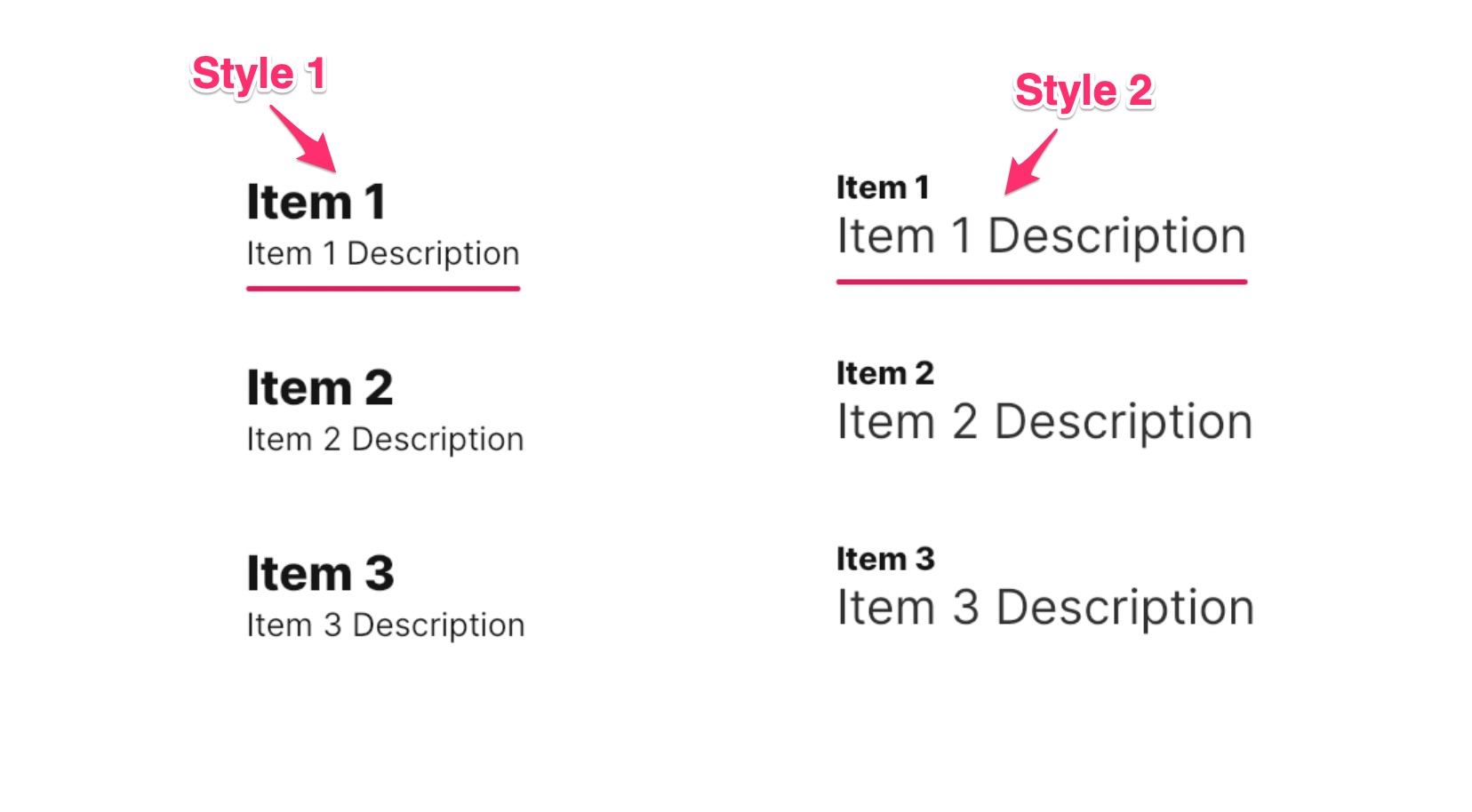
The FUIWizardPageItemLabel component offers two distinct styles, which are defined within the FUIWizardPageItemLabelStyleOption enum:
FUIWizardPageItemLabelStyleOption.style1: This style sets the item name font size to be larger than the description font size.FUIWizardPageItemLabelStyleOption.style2: This style sets the item name font size to be smaller than the description font size.
To configure the styles of the FUIWizardPageItemLabel, simply assign the desired style via the styleOption parameter.
Positioning the item label tabs
The positioning of the item label tabs could be altered. This can be accomplished by assigning the pageItemsPosition parameter with values from the FUIWizardPageItemsPosition enum within the FUIWizardPane.
Switching to a specific page
To navigate to a specific page item, you can utilize the wizard pane controller as follows:
Alternatively, if the FUIWizardPageItem is assigned with a key, the controller can access the page item by specifying the key.
Parameters - FUIWizardPageItem
Parameters | Description |
|---|---|
FUIColorScheme fuiColorScheme | The color scheme for the item (usually seen on the item tab). |
EdgeInsets? itemTabPadding | The padding (if any) between the item tabs. |
bool selectable | Toggle the item to be directly selected via a tap/click (default to |
ValueGetter\<bool\>? selectableWhen | The toggle function to enable/disable item tab selection. |
VoidCallback? onSelected | The callback function when the item is selected. |
bool decoBarShow | Toggle display of deco bar on the item label. |
Color? decoBarActiveColor | Customize the active color of the item label deco bar. |
double decoBarHeight | Customize the height of the item label deco bar. |
BorderRadius decoBarBorderRadius | Customize the border radius of the item label deco bar. |
Duration decoBarAniDuration | Customize the animation duration of the item label deco bar. |
Curve decoBarAniCurve | Customize the animation curve of the item label deco bar. |
Parameters - FUIWizardPageItemLabel
Parameters | Description |
|---|---|
Widget tabLine1 | The first line of the item tab label. |
Widget tabLine2 | The second line of the item tab label. |
FUIWizardPageItemLabelAlignment alignment | The alignment options for the label. |
FUIWizardPageItemLabelStyleOption styleOption | The style options for the label. |
Parameters - FUIWizardPane
Parameters | Description |
|---|---|
FUIWizardPaneController? fuiWizardPaneController | Assign the pane wizard controller. |
List\<FUIWizardPageItem\> pageItemList | The list of page items. |
FUIWizardPageItemsPosition pageItemsPosition | Configure the items tab position. |
double contentViewHeight | Customize the view height of the item content pane (default to 450). |
double pageItemsSectionLeftRightWidth | If the item tabs are position on the left or right, the space between the tabs and the content region could be customized. |
int initialPageIndex | The first page item in the list to be displayed. Index starts with |
bool showPageItems | Toggle the show of the item tabs/labels. |