Text Pill
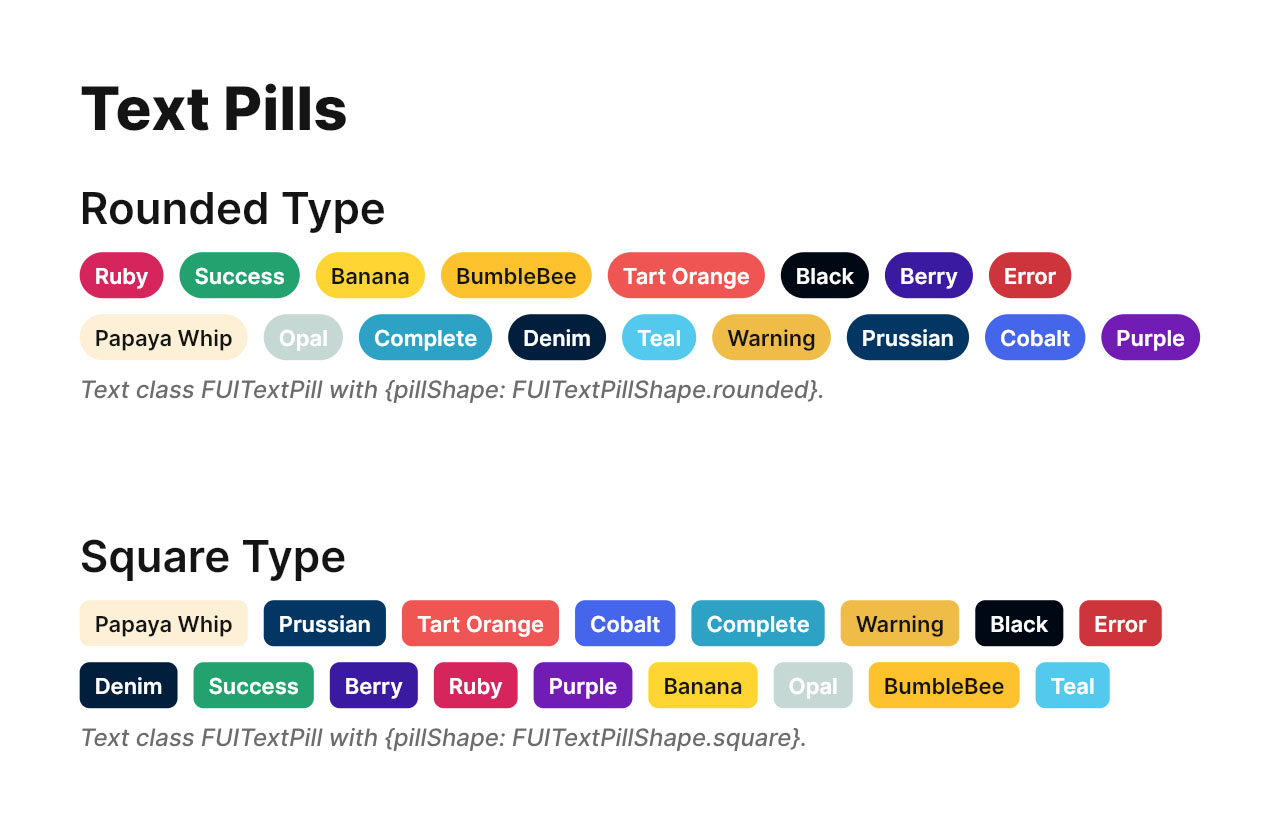
For those familiar with the widely-used HTML/Javascript Bootstrap framework, the Focus UI Kit’s text pill, denoted as FUITextPill, bears a resemblance to the badge element within the Bootstrap framework. This element is commonly employed to denote labels or tags on specific artifacts.
The FUITextPill is available in two distinct shapes: a rounded-cornered version and a rectangular one.
Widget Classes Location
The dart file which contains all classes for text pill is located in:
Widget Theme Location
The FUITextPillTheme class serves as the theme class for the FUITextPill component. Kindly explore this theme class to examine the various settings available for FUITextPill.
Accessing the theme
To access the theme class object, it can be done through:
Usage
To display a simple text pill (with default color scheme and size)
Text pill with different sizes
Text pill with different color scheme
Text pill with in rectangle shape
Parameters
Parameters | Description |
|---|---|
Text text | The Text widget for displaying the text. If you have a custom style, do fill in the |
FUIColorScheme fuiColorScheme | The color scheme for the text pill. The default is |
FUITextPillShape pillShape | The shape of the text pill. The default is |
FUITextPillSize pillSize | The size of the text pill (small, medium or large). The default is |
Color? backgroundColor | If you prefer a different background color, set this parameter and it will override the default color scheme. |